
Overview
You can delete your Recipe Notes account at any time. Deleting your account permanently removes your data from our servers, including your saved recipes, cookbooks, meal plans, grocery lists, and account information. This action cannot be undone.
Want to keep a copy of your recipes? Before you delete your account, download everything with Export Recipes.
Before You Start: Cancel Your Subscription
If you subscribe to Pro or Family through the App Store or Google Play, deleting your account does not cancel your subscription — Apple and Google handle billing. Cancel it first on your device:
- iPhone or iPad: Settings → your name → Subscriptions → Recipe Notes
- Android: Play Store → Profile → Payments & subscriptions → Subscriptions → Recipe Notes
Step 1: Open Your Profile
Open Recipe Notes, go to Settings, and tap your profile at the top of the page to open Me.
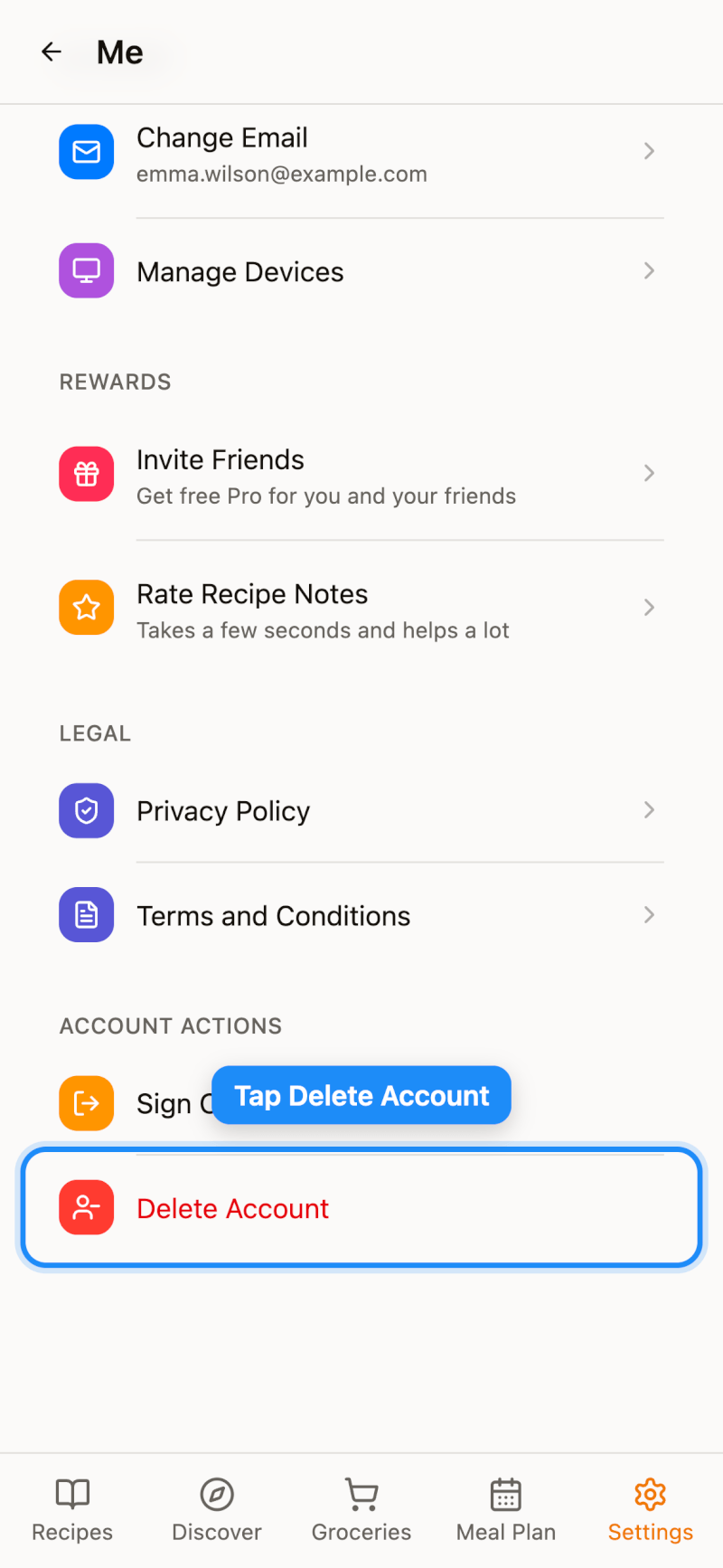
Step 2: Tap Delete Account
Scroll to the bottom and tap Delete Account.
Step 3: Confirm Deletion
Read the warning, type delete to confirm, then tap the delete button to permanently delete your account.
What Happens After Deletion
- Your account and login credentials are permanently removed, and you're signed out.
- All your recipes, cookbooks, meal plans, grocery lists, and recipe exports are deleted.
- If you organize a Family, the family is dissolved and its members lose shared access. If you're a member, you leave the family.
- This process is irreversible — your data cannot be recovered.
Need Help?
If you're unable to access the app or have trouble deleting your account, contact us at support@recipenotes.app with the email address associated with your account, and we'll process the deletion for you.